The recent Steam update brings a host of exciting improvements, giving gamers more control and customization options than ever before. For those who spend hours managing extensive game libraries, this update offers tools to organize and personalize their collections seamlessly. From customizable game titles to better accessibility options, the update aims to enhance the overall user experience on both desktop and Steam Deck devices. Whether you’re a casual player or a dedicated enthusiast, these new features are designed to make your gaming environment more tailored and efficient.
Customization Features for Game Organization
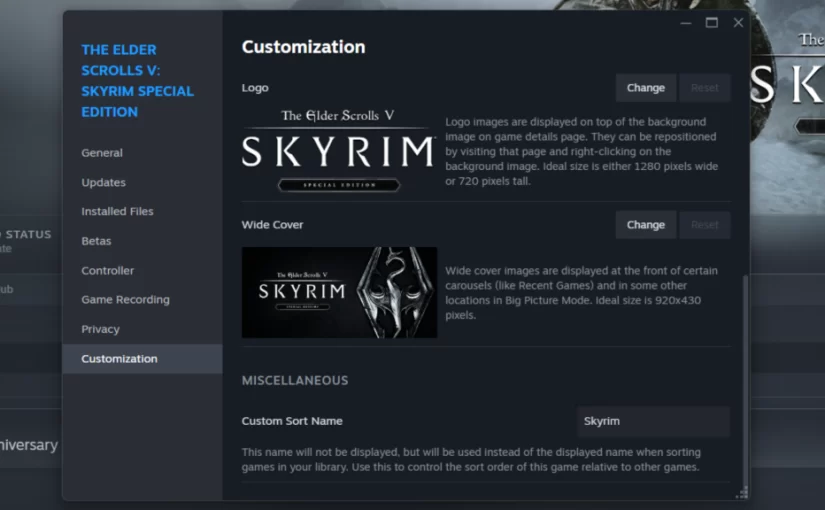
One of the most notable additions is the new Customization tab, which allows users to assign custom sort names to their games. This feature is especially beneficial for gamers with large libraries, as it helps streamline browsing and management. For example, a user can change the lengthy title “The Elder Scrolls V: Skyrim Special Edition” to simply “Skyrim,” making it easier to locate and organize within the collection. This flexibility ensures that your library reflects your preferred naming conventions, simplifying navigation.
Additionally, the customization menu enables players to set personalized covers, wide covers, backgrounds, and logos for each game. Imagine replacing a default cover with a screenshot of your meticulously crafted character or a favorite scene from the game—a feature that truly caters to the creative and personal touches of avid gamers. This level of customization not only enhances visual appeal but also makes your library uniquely yours.
Accessibility and Performance Improvements
The update introduces new accessibility options within desktop mode, catering to gamers who may benefit from enhanced visual and interface adjustments. Features like high contrast modes, reduced motion settings, and UI scaling provide a more comfortable experience for users with different needs. While these options serve to improve usability, they also demonstrate Steam’s commitment to inclusivity and user-centric design.
The return of the in-game performance monitor is another key update, offering more accurate readings than traditional tools like Task Manager. This feature helps gamers keep track of their system’s performance in real-time, aiding in troubleshooting and optimizing gameplay experiences. Furthermore, the system now notifies users when trades are reversed through Trade Protection—though currently limited to Counter-Strike, it signifies ongoing improvements in trade security and transparency.
Enhanced User Interface and Controller Support
Wider and better-formatted Steam store pages provide an improved browsing experience, especially on widescreen monitors. This adjustment ensures that store content is more accessible and visually appealing, encouraging exploration and discovery.
Controller support also receives significant attention, with updates that include new analog joystick, trackpad, and D-pad options. Button icons for popular controllers like 8BitDo have been refined, offering clearer, more intuitive controls. These enhancements contribute to smoother gameplay and easier setup across various controller types, making Steam’s platform more versatile for different hardware configurations.
The update is now live across the main Steam channel, with no need to opt into beta versions. If your system has already received the update, explore the new features firsthand to see how they can improve your gaming experience. For aspiring developers or those interested in the indie scene, understanding the journey of game creation can be insightful. Learning about the challenges faced by solo developers can be inspiring, and exploring resources like this guide on indie game development can offer valuable perspective.
If you’re curious about how developers craft engaging stories or overcome technical hurdles, you might find value in this hacker game development story. Such stories highlight the dedication required to bring a game to life and can motivate budding creators.
For those just starting out in game design, figuring out where to begin can be overwhelming. A helpful resource that addresses this is the starting point for game development, guiding newcomers through initial steps and essential skills.
Finally, embracing diversity within the tech and gaming communities enriches the industry and fosters innovation. Insights into what a modern, inclusive game developer looks like can be found in this exploration of diversity in tech, encouraging a broader representation of voices and talents.
Embrace the latest Steam updates to personalize your gaming library, improve accessibility, and enjoy a more streamlined experience across devices.