


Linking your gaming accounts can unlock new levels of convenience and social interaction. By connecting your Epic Games and Steam profiles, you can easily invite friends from both platforms, share game progress, and utilize your wallet funds across services. This guide will walk you through the process of linking and unlinking these accounts, as well as answer common questions about cross-platform game management.
The Benefits of Connecting Your Steam and Epic Games Accounts
Establishing a link between your Steam and Epic Games accounts offers numerous advantages. Primarily, it allows you to extend your gaming social circle by inviting friends from either platform to join your sessions. If your friends only use Steam or Epic Games, you can still play together on shared titles. Furthermore, when a game is compatible across both services, your progress and achievements are synchronized, providing a seamless experience. An additional benefit is the ability to use your Steam Wallet balance to make purchases on Epic Games, making transactions more flexible. For those interested in expanding their understanding of the gaming industry, exploring the costs involved in game development can be insightful, and you can learn more about this from this resource.
How to Link Your Epic Games and Steam Accounts
To connect your accounts, follow these straightforward steps:
- Launch your preferred web browser and navigate to store.epicgames.com.
- Sign into your Epic Games account by clicking the Sign In button located at the top-right corner.
- Enter your login credentials to access your account.
- Once logged in, click on the Account button in the top-right menu.
- From the sidebar, select Apps and then Connections.
- Find the Steam option and click the Connect button next to it.
- Confirm your choice by selecting Link Account.
- You will be prompted to sign in to your Steam account. Enter your credentials to authorize the connection.
- After successful authentication, click Sign In again to finalize the linking process.
This procedure will successfully integrate your Steam and Epic Games accounts, enabling you to enjoy a more connected gaming experience.
How to Unlink Your Epic Games and Steam Accounts
If you decide to disconnect your accounts, the process is just as simple:
- Log into your Epic Games account and go to the Account Settings.
- Select Apps and then Connections.
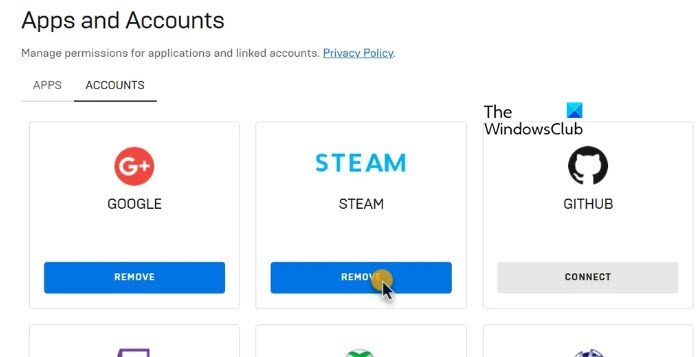
- Locate the Steam account section and click the Remove button.
- Confirm your choice to unlink the accounts.
Unlinking allows you to reset your connection or switch accounts if necessary. It also helps manage your account data more effectively, especially if you want to prevent accidental sharing or access issues. For those considering building their own gaming platform or app, understanding the costs involved can be crucial, and insights are available at this site.
Can You Share Progress Between Epic Games and Steam?
Yes, in many cases, you can share game progress across both platforms, provided the game supports cross-platform synchronization. Once linked, any achievements, saved data, or progress made on one account will reflect on the other. This feature is particularly useful for players who switch devices or platforms frequently. To ensure compatibility, always verify whether the specific game supports cross-platform saves before attempting to sync. For a broader understanding of the gaming landscape, including what it means to be an indie developer, visit this resource.
Choosing Between Steam and Epic Games
Both platforms offer extensive libraries and user-friendly interfaces. Steam boasts a larger selection of titles, making it a popular choice among gamers worldwide. Meanwhile, Epic Games provides exclusive deals and free titles regularly, appealing to budget-conscious players. Your choice often depends on personal preference and the types of games you enjoy. For insights into optimizing your game development team or understanding industry trends, exploring effective team-building strategies can be highly beneficial.
By linking your accounts, you open up new possibilities for social gaming, cross-platform play, and streamlined purchases. Whether you’re a casual gamer or an aspiring developer, understanding these connection processes enhances your overall experience and engagement within the gaming community.