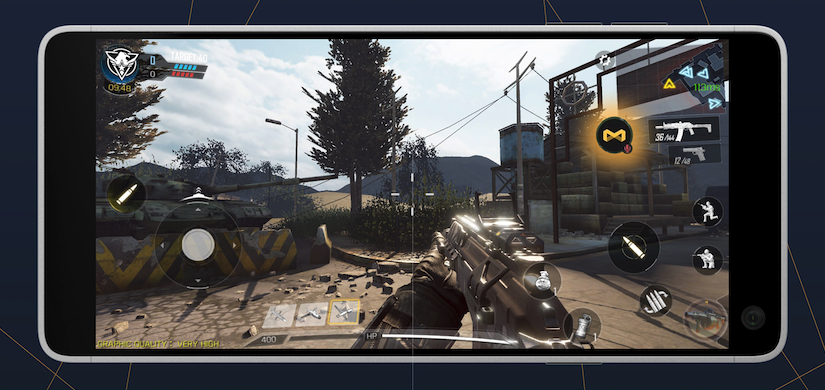
Capturing epic gaming moments on your mobile device is easier than ever, thanks to specialized apps and built-in features. Whether you’re celebrating a rare pull in your favorite card game or showing off a flawless victory in a shooter, recording and sharing your gameplay clips can elevate your gaming experience and showcase your skills. This guide explores the best methods to record mobile gameplay, focusing on how to do so efficiently and professionally on Android devices. From dedicated recording apps to native screen capture tools, discover how to preserve your gaming highlights with clarity and ease.
Game Recording and Clip Creation on Mobile Devices
There are countless moments in mobile gaming that you might want to save or share, such as scoring a rare boss drop in a role-playing game, pulling off a tricky combo in a fighting game, or simply sharing your impressive gameplay with friends. Sometimes, these moments happen so quickly that traditional recording methods may not capture them at the right time. To address this, using a dedicated app like Medal Recorder allows you to create clips of your gameplay, even if you didn’t start recording beforehand.
Medal Recorder on Android is designed to be lightweight and unobtrusive, running seamlessly in the background while you play. It offers options to record game and microphone audio, enabling you to capture both your gameplay and commentary. With features like retroactive recording, the app continuously buffers gameplay so you can save recent moments even if you weren’t actively recording at the time. This flexibility makes it ideal for capturing spontaneous highlights without hassle.
How to Record Mobile Games with Medal
Step 1:
Download Medal Recorder from the Google Play Store. The app is optimized for low resource consumption and integrates smoothly with your gaming sessions. Once installed, it can run in the background, ready to capture whenever something exciting happens.
Step 2:
To save a recent gameplay moment, simply tap the Medal button during your game. The app’s retroactive recording feature means you don’t need to press record beforehand; it automatically buffers gameplay, so when you tap, it saves the last few seconds or minutes depending on your settings. You can customize recording quality, clip length, and audio options in the app’s settings menu. For detailed instructions, see how to clip using Medal on Android.
Step 3 (optional but recommended):
Access your clips directly through the Medal Mobile app. From there, you can easily publish, share, or upload your recordings to social media platforms. The app supports importing clips from other sources, including local storage and even Xbox clips. For more details, check out how to upload clips on Android.
Using Medal Android Recorder combined with the Medal app simplifies the process of capturing, editing, and sharing your gaming highlights, making it a top choice for mobile gamers.
Alternative Mobile Recording Options
While Medal offers a comprehensive solution, several other tools can also help you record gameplay on Android devices:
- Built-in Screen Recorders: Many phones and tablets come with native screen recording features. These are straightforward but require you to start recording manually each time, which can be inconvenient if you want to capture something unexpectedly. Additionally, they do not support retroactive recording, so you must be prepared beforehand to avoid missing moments.
- AZ Screen Recorder and Mobizen Screen Recorder: These apps are popular among mobile gamers for their ease of use. Like built-in recorders, they require proactive recording, meaning you need to initiate recording before the gameplay event occurs.
- Glip Screen Recorder: Similar to Medal, Glip offers retroactive recording capabilities, but with more limited options for editing or sharing. It can be a good choice if you prefer a lightweight app with automatic buffering features.
Ultimately, for the best experience, combining Medal Recorder with its dedicated app offers an efficient way to automatically capture your best gaming moments without prior setup. This approach aligns with best practices in game content creation and can help you build a portfolio of impressive clips.
Final Tips for Effective Mobile Game Recording
- Ensure your device has sufficient storage space to accommodate high-quality recordings.
- Experiment with different recording settings to find the optimal balance between quality and performance.
- Consider using external microphones for clearer commentary when sharing gameplay.
- For more advanced editing and clipping features, explore professional software or dedicated gaming capture tools, especially if you plan to create content regularly.
Looking to expand your gaming business or improve your content creation? Learning how to set up your enterprise correctly can be a game-changer. For insights on establishing a professional game development studio, visit this resource. Additionally, mastering the art of perfect game scores can elevate your gameplay reputation—discover how to achieve top ratings at this site. For scaling a talented team to support your creative projects, check out this guide.
By applying these strategies, you’ll be able to effortlessly capture and showcase your gaming prowess on Android devices, keeping your best moments ready to share with friends or your online audience.